An OBD port is the 16-pin diagnostic socket that lets a scan tool read trouble codes, live data, and emissions readiness from your vehicle’s control modules. If you are wondering what an OBD port is in a car, it is a standardized connector found under the dash on most US-market vehicles from 1996 onward.
What Is an OBD Port?
An OBD port is the access point for your vehicle’s onboard diagnostics system. The OBD connector is the physical gateway to the ECU and related modules, and on modern vehicles the OBD-II connector uses the familiar 16-pin trapezoid shape.
On most vehicles, the port gives you access to:
- Generic powertrain trouble codes
- Freeze-frame data captured when a fault sets
- Live sensor data such as coolant temp, RPM, fuel trims, and throttle angle
- Emissions readiness monitor status
What it does not do is identify a failed part by itself. A code points you toward a system fault, not an automatic repair. That distinction matters when the OBD scanner port shows a lean code, a misfire, or an EVAP leak. The code is the starting point, not the finish line.
Pro Tips are nuggets of information direct from ASE-certified automobile technicians working with CarParts.com, which may include unique, personal insights based on their years of experience working in the automotive industry. These can help you make more informed decisions about your car.
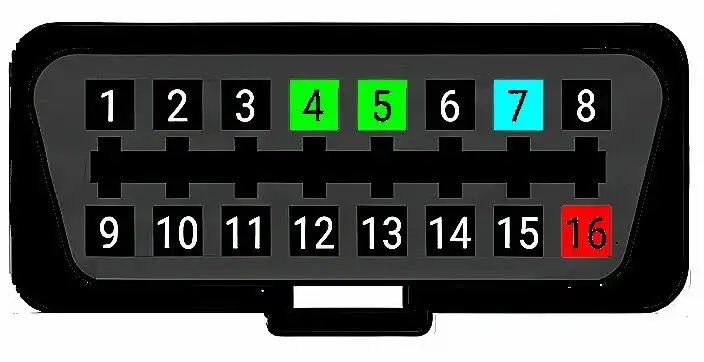
Pro Tip: Do not get hung up on the terminology here. Mechanics usually call this the DLC, or Data Link Connector, as it is labeled on wiring schematics. Pin 16 is always 12-volt power, and pins 4 and 5 are always ground. On vehicles that use K-Line communication, pin 7 is the K-Line for generic OBD data, but the other pins may differ from one vehicle to the next, so have a schematic handy.
Where Is the OBD Port?
The OBD port is usually found under the driver-side lower dash, within easy reach of the steering column, and sometimes sits behind a small cover or near the fuse-box area.
By regulation, the OBD-II connector must be located within 3 feet of the driver’s seat and accessible without tools.
Here is how to find the OBD port quickly:
- Check below the steering column and above the driver footwell.
- Look near the fuse-box cover, kick panel, or lower dash trim.
- Feel for a removable cap labeled OBD, Diagnostic, or DLC.
- Check the side of the center console if it is not in the usual driver-side spot.
- Confirm the shape before plugging in. The connector should be a 16-pin female socket.
Because OBD port location varies by make and year, do not assume every car puts it in the exact same spot. A Honda Civic usually places it low under the driver-side dash. On a Mazda 3, it is also typically under the lower dash near the steering column. Some vehicles hide it well enough that a flashlight saves time.
An OBD-II port should be accessible without removing major trim. If you find yourself prying panels, stop and check the owner’s manual first.
What Can the Port Actually Tell You?
The port can tell you quite a bit, but only if you use the data correctly. It works best for confirming what the car detected, when it detected it, and whether the fault is current, pending, or historical.
A useful scan session can help you:
- Confirm whether the check engine light is tied to fuel, ignition, airflow, EVAP, or catalyst faults
- Check whether a repair actually fixed the problem
- Watch live data instead of replacing parts based on guesswork
- See whether readiness monitors are complete before an emissions test
Consider this example: you pull a lean-condition code. Rather than immediately replacing the front oxygen sensor, check short-term and long-term fuel trims, MAF airflow, and vacuum leaks. If trims are heavily positive at idle but improve off-idle, the smarter next step is smoke testing for a vacuum leak, not ordering new sensors.
How Do You Diagnose a Port That Will Not Communicate?
If your OBD-II port is not working, start with power and ground before blaming the scanner. The most common issue is a blown fuse, and DIYers often miss it because the port may share a circuit with the horn, cigarette lighter, or accessory outlet.
Use this quick reference table first:
| Symptom | Likely Cause | Next Step |
| Scanner will not power up | No battery power at pin 16, blown fuse | Check DLC and outlet-related fuses |
| Scanner powers up but will not link | Damaged pins, bad grounds, network fault, incompatible tool | Inspect pins, verify grounds, try another scanner |
| Intermittent connection | Loose terminal tension, aftermarket dongle issue | Wiggle-test connector and remove add-on devices |
| Codes clear but return immediately | Fault still present | Diagnose root cause before clearing again |
Follow these steps:
- Inspect the port for bent, spread, recessed, or corroded terminals.
- Check for battery voltage at pin 16 with a multimeter.
- Verify good ground at pins 4 and 5.
- Test the scanner on another vehicle.
- Remove any always-plugged-in telematics or tuning devices.
- Check battery voltage and charging condition if communication is inconsistent.
Less obvious failures include a module dragging down the CAN network, water intrusion under the dash, or a cheap scanner that does not support the vehicle’s protocol set. On a Nissan Altima, it is also worth noting that Nissan warns against using unsupported plug-in OBD devices during normal driving, as they can interfere with vehicle systems.
Should You Clear Codes Right Away?
No. Clear codes only after you have captured all the information and fixed the underlying problem.
Use this order:
- Read stored, pending, and permanent codes.
- Save freeze-frame and readiness data.
- Perform the repair or pinpoint test.
- Recheck live data and run the vehicle.
- Clear codes only when you are ready to confirm the fix.
One important warning: clearing codes resets readiness monitors on many vehicles. This can leave you unprepared for an inspection even if the check engine light stays off.
What Scanner Makes Sense for DIY Use?
The right scanner depends on how deep you want to go. A basic code reader works for quick checks, but an enhanced scanner is a better long-term investment for real diagnosis.
Choose based on your needs:
- Basic reader for code checks and readiness monitors
- Budget Bluetooth dongle and a compatible phone app for basic DIY code checks and live data
- Bluetooth scan tool for live data, graphs, and easier road testing
- Enhanced scanner for ABS, SRS, transmission, and service functions
- Brand-focused software if you work on one platform regularly
This matters especially on cars like a Mini Cooper or BMW M2, where enhanced manufacturer-specific data is often more useful than generic OBD coverage alone. The Tesla OBD port situation is different again, because many Tesla diagnostics require an adapter, brand-specific hardware, or a nontraditional connection path rather than a standard universal scan tool. A good OBD setup saves time only when you use it to narrow down the fault logically. Read the code, verify the data, test the circuit, then replace the part that actually failed.
Keep Reading: Related Posts






Any information provided on this Website is for informational purposes only and is not intended to replace consultation with a professional mechanic. The accuracy and timeliness of the information may change from the time of publication.